The results of the 2026 SSC and equivalent exams will be published on August 10. That morning, more than 1.85 million students and their families will try to access the same servers within the span of an hour, and many will spend half an hour anxiously staring at a page that won’t load.
It doesn’t have to be this way. This guide covers all the official methods for checking your results, which one is the fastest at any given time, the eleven test board codes, and what to do if you run into a problem.
The Quick Answer
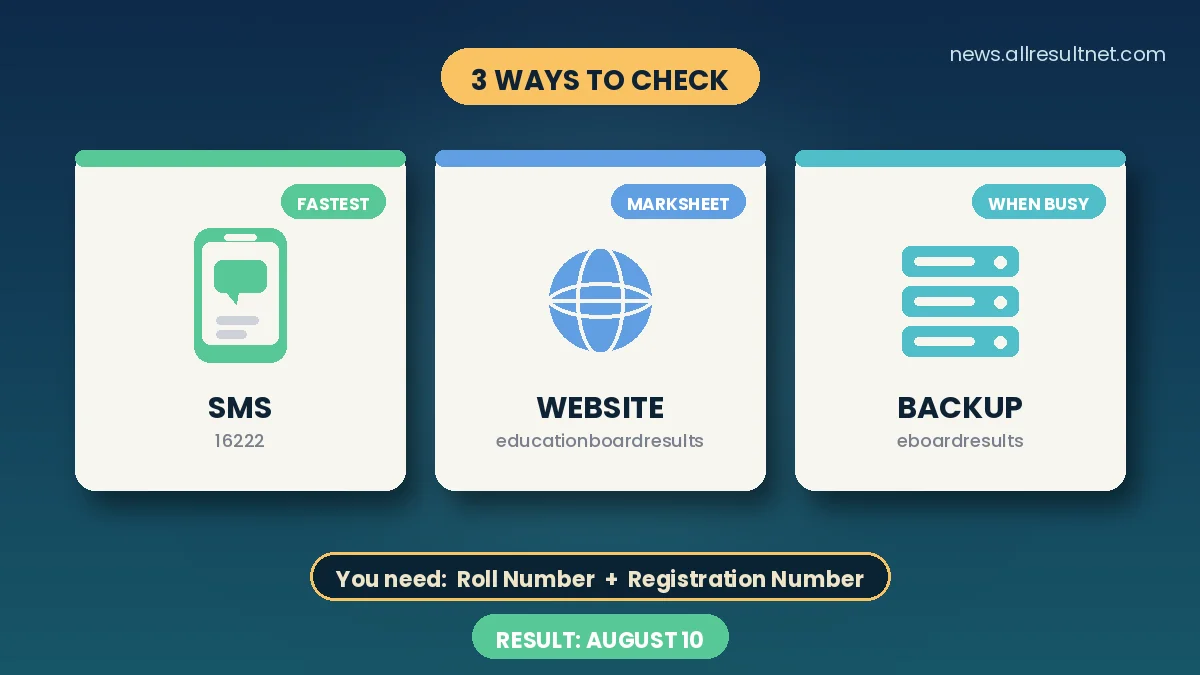
- Fastest overall on result morning: SMS to 16222
- Best for full marksheet: educationboardresults.gov.bd
- Best backup when the main site is overloaded: eboardresults.com
- What you need in hand: your roll number and registration number, exactly as printed on your admit card
Method 1: educationboardresults.gov.bd (Full Marksheet)
This is the main government results portal and the one that gives you complete subject-wise marks.
- Open www.educationboardresults.gov.bd in any browser
- In Examination, select SSC/Dakhil/Equivalent
- In Year, select 2026
- In Board, select your own education board
- Enter your Roll Number and Registration Number exactly as printed on your admit card
- Solve the small security captcha (usually a simple addition)
- Press Submit
Your result appears with grades and grade points for each subject. Save a screenshot or print it — you will need these details during college admission.
Method 2: eboardresults.com (The Backup Nobody Uses)
Here is the tip that will save you the most frustration on result day: there is a second official board results website, and far fewer people think to use it.
eboardresults.com is the education boards’ web-based results platform, carrying results with detailed marks for SSC, Dakhil, HSC, Alim, vocational and other examinations — including archived results from previous years.
When the main portal buckles under first-hour traffic, this is where to go. The information you need is the same: examination, year, board, roll and registration number.
Practical strategy: open both sites in separate browser tabs before the result goes live. Whichever responds first, use that one.
Method 3: SMS — Works Without Internet
When both websites are crawling, SMS almost always gets through. It works from any mobile phone, on any operator, with no internet connection at all.
Format: SSC (space) first three letters of your board (space) Roll (space) 2026 → send to 16222
Example: SSC DHA 123456 2026
All Board Codes
| Education Board | SMS Code |
|---|---|
| Dhaka | DHA |
| Rajshahi | RAJ |
| Chattogram | CHI |
| Cumilla | COM |
| Jashore | JES |
| Barishal | BAR |
| Sylhet | SYL |
| Dinajpur | DIN |
| Mymensingh | MYM |
| Madrasah Board (Dakhil) | MAD |
| Technical Board | TEC |
Important: Madrasah Board candidates should type Dakhil in place of SSC — for example, Dakhil MAD 123456 2026. Technical Board candidates use their board’s format with the TEC code.
Each SMS carries a small standard charge. You can send it before the official publication time; the reply simply arrives once results go live.
Which Method Should You Actually Use?
The honest answer depends on the hour:
In the first hour after publication: use SMS. Both websites will be at their slowest precisely when everyone is trying at once. SMS is queued and delivered rather than requiring a live page load, so it wins in exactly the conditions where websites fail.
One to three hours later: try educationboardresults.gov.bd for your full marksheet. Traffic thins considerably once the initial rush passes.
If the main site still won’t load: switch to eboardresults.com.
For institutions: schools can download their complete institutional result sheet using their EIIN number through the board systems — which is how your school produces the printed list posted on its notice board.
When Something Goes Wrong
“Result not found” — the most common cause is a wrong registration number. The portal needs both roll and registration, and people frequently type the registration from memory. Copy both directly from your admit card.
Wrong board selected — students at madrasahs are under the Madrasah Board (Dakhil), not the general board of their district. Vocational students are under the Technical Board. Selecting your geographic board instead will return nothing.
Page won’t load at all — don’t refresh repeatedly; that adds to the congestion. Wait two minutes, then try the alternative website or SMS.
SMS returns nothing — check your spacing. There must be a single space between each element: SSC, the three-letter code, the roll, and 2026. Extra spaces or missing ones cause failures.
What Comes Next
If your result is not what you expected: you can request a review via Teletalk’s SMS system within a fixed timeframe, which will be announced along with the results, usually within a few days, and at a per-subject fee. We will publish the full review guide when the notice is released.
For everyone: university admissions after the HSC are processed shortly after the results are published, through the central online system, and your grade point average (GPA) will determine your options.
A Word of Caution
Every results season, a wave of fake links appears on Facebook promising to “check the results early,” some of which collect personal information. There are exactly three official channels: the two websites mentioned above and the SMS service 16222. No other is official, no legitimate platform will ask you for money, and nothing will be available before the advertised time.
Before August 10: A Two-Minute Checklist
- Find your admit card and note the roll and registration numbers — save a photo on your phone and write them somewhere too
- Bookmark both websites now
- Save the SMS format in your drafts, ready to send
- Tell your family the plan so five people aren’t refreshing five tabs at once
We will publish the direct links, board-wise pass rates and GPA-5 statistics on result day itself. Best of luck to every SSC 2026 examinee — and remember, whatever the screen says on August 10, it is one step in a long road.